

12 Best Data Migration Tools in 2026: Compare Features & Use Cases
Moving data from one system to another can be a big job. A business may need to move customer records, sales data, files, databases, or entire applications to a new platform. If the process goes wrong, important data can be lost, business operations can slow down, and costs can rise.
That is why many businesses use data migration tools to move information safely and efficiently.
The right tool can help you transfer data between databases, move information to the cloud, connect business apps, and keep data up to date across systems. Some tools are easy to use without coding, while others are built for large companies with complex IT needs.
But not every tool does the same job. A database migration tool may not be the best choice for moving files or syncing data from business apps to a data warehouse.
In this guide, we compare 12 popular data migration tools, explain their main features, highlight their limitations, and help you choose the right option for your needs.
Quick comparison: Best data migration tools
If you want a quick answer, start with this comparison. The best choice depends on the type of data you need to move, your destination platform, your budget, and your technical skills.
| Data migration tool | Best for | Main advantage | Main limitation |
| AWS Database Migration Service | AWS database migrations | Managed database migration and replication | Best fit for AWS-focused projects |
| Azure Database Migration Service | Moving databases to Azure | Microsoft ecosystem integration | Supported migration paths vary |
| Google Cloud Database Migration Service | Google Cloud database moves | Managed migration with ongoing replication | Limited to supported destinations |
| Airbyte | Flexible data integration | Open-source and self-hosted options | Some connectors need extra maintenance |
| Fivetran | Automated data pipelines | Managed data movement | Costs depend on usage |
| Matillion | Cloud data warehouses | Visual data transformation workflows | More than needed for simple transfers |
| Qlik Talend Cloud | Enterprise data integration | Data transformation and quality features | May need specialist setup |
| SnapLogic | App and data integration | Visual workflow automation | Pricing and setup need evaluation |
| IRI NextForm | File and data format conversion | Data conversion and masking | Narrower use case than full integration platforms |
| CloudFuze | Cloud files and business content | File and content migration | Not designed for every database use case |
| Apache NiFi | Custom data flows | Flexible routing and tracking | Requires technical expertise |
| Oracle GoldenGate | Enterprise database replication | Continuous data replication | Can be costly and complex |
Comparison based on documented product capabilities and common use cases, not a universal performance ranking. Check each vendor’s current supported systems, pricing, and licensing before choosing.
1. AWS Database Migration Service (AWS DMS)
Best for: Businesses moving databases to Amazon Web Services (AWS).
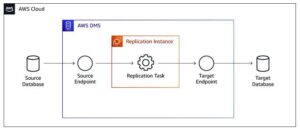
AWS Database Migration Service helps businesses move data from supported databases to other supported database systems. It can handle migrations between the same database types and, in supported cases, between different types.
For example, a company may want to move an existing database to Amazon RDS or migrate data from Oracle to PostgreSQL. AWS DMS can also keep the target database updated while changes continue in the source system.
Key features
- Full data loads and ongoing replication.
- Support for selected same-engine and cross-engine migrations.
- Integration with AWS database services.
- Options for reducing downtime during a planned migration.
Pros
- Useful for businesses already using AWS.
- Supports one-time moves and ongoing replication.
- Reduces the need to build a complete migration process from scratch.
Cons
- Requires knowledge of AWS and database setup.
- Complex migrations may need separate schema conversion and testing.
- Total costs depend on the services and resources used.
Our verdict: AWS DMS is a strong starting point if your destination is AWS. Check database compatibility and schema-conversion needs before starting.
2. Azure Database Migration Service
Best for: Businesses moving supported databases to Microsoft Azure.
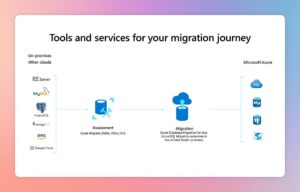
Azure Database Migration Service helps teams move databases from existing systems to supported Azure data platforms. Microsoft also provides migration assessments and guides to help teams prepare their databases before moving them.
Key features
- Migration support for selected database systems.
- Guidance and assessments for migration readiness.
- Online and offline migration options for supported scenarios.
- Integration with Azure database services.
Pros
- A natural option for companies already using Microsoft Azure.
- Offers guidance for supported migration paths.
- Can support migrations designed to reduce downtime.
Cons
- Compatibility depends on the source, destination, and migration method.
- Some projects require changes to database settings or applications.
- Teams may need extra tools for data transformation and validation.
Our verdict: Consider Azure Database Migration Service if you plan to move databases into Azure. Review Microsoft’s current migration guidance for your exact source and destination before committing.
3. Google Cloud Database Migration Service
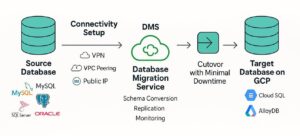
Best for: Businesses moving supported databases to Google Cloud.
Google Cloud Database Migration Service helps teams migrate supported databases into services such as Cloud SQL and AlloyDB. It can perform an initial data load and continue replicating changes before the final switch to the new database.
Key features
- Managed database migration.
- Ongoing replication for supported migration paths.
- Migration status and progress tracking.
- Support for selected MySQL, PostgreSQL, and SQL Server migrations.
Pros
- Useful for businesses moving to Google Cloud.
- Reduces the need to manage all replication tasks manually.
- Can help limit downtime during the final switch.
Cons
- Only supports specific source and destination combinations.
- Some migrations need extra conversion or transformation work.
- Not the right fit if your main goal is moving files or business app data.
Our verdict: Choose Google Cloud Database Migration Service when your destination is Google Cloud and your database is supported.
4. Airbyte
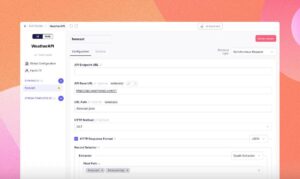
Best for: Teams that need flexible data movement and control over their setup.
Airbyte is a data integration platform that connects different data sources with databases, cloud platforms, and data warehouses. It offers open-source options, hosted services, and self-managed deployment choices.
It can be useful when a business needs to move data from several sources and continue syncing updates after the first transfer. Airbyte also provides tools for building connectors when a required integration is not available.
Key features
- Connectors for many data sources and destinations.
- Incremental synchronization for supported connections.
- Cloud and self-hosted deployment options.
- Custom connector development.
Pros
- Offers flexibility for technical teams.
- Self-hosting can provide more control over the environment.
- Useful for ongoing data pipelines, not just one-time transfers.
Cons
- Connector quality and maintenance needs can vary.
- Self-hosting requires infrastructure and technical support.
- Advanced workflows may require engineering skills.
Our verdict: Airbyte is worth considering if you want flexible data integration and have the team to manage your chosen deployment.
5. Fivetran
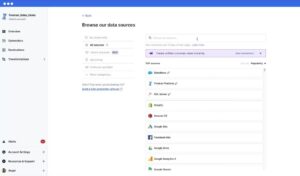
Best for: Businesses that want to automate recurring data transfers.
Fivetran focuses on managed data pipelines. It connects supported business applications, databases, and other sources to destinations such as data warehouses. This can help teams bring sales, marketing, finance, and customer data into one place for reporting.
Unlike a tool designed mainly for a single database cutover, Fivetran is often a better fit when the business needs data to keep flowing after the initial setup.
Key features
- Managed data pipelines.
- Prebuilt connectors for supported systems.
- Automated synchronization and schema handling.
- Monitoring and error alerts.
Pros
- Reduces the need to maintain custom data pipelines.
- Useful for recurring analytics workflows.
- Can help data teams spend less time on routine data movement.
Cons
- Costs can grow with data usage.
- Custom or unsupported sources may need extra work.
- It may offer more than you need for a simple, one-time database move.
Our verdict: Consider Fivetran if your main goal is to automate data collection from multiple systems. Review its current pricing model against your expected data volume.
6. Matillion
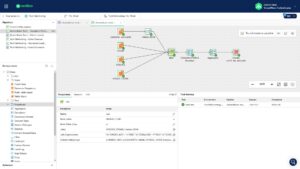
Best for: Teams moving data into cloud data warehouses and preparing it for analysis.
Matillion provides tools for building data pipelines and transforming information. It is useful when moving data is only one part of the job and the information must also be cleaned, combined, or changed before analysts can use it.
For example, a business may bring sales data from several systems into a cloud warehouse and standardize customer names, dates, and product categories.
Key features
- Visual pipeline design.
- ETL and ELT workflows.
- Data transformation and orchestration.
- Integration with supported cloud data platforms.
Pros
- Helps teams manage data movement and transformation together.
- Visual workflows can make pipeline logic easier to understand.
- Useful for analytics and reporting projects.
Cons
- Complex transformations may require SQL or Python.
- Costs and capabilities depend on the selected product and plan.
- Can be unnecessary for straightforward file transfers.
Our verdict: Matillion is a good candidate when your migration also involves preparing data for analytics, not just copying it from one place to another.
7. Qlik Talend Cloud
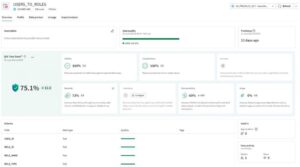
Best for: Enterprises that need data integration, transformation, and quality controls.
Qlik Talend Cloud combines data integration capabilities with tools that help businesses prepare and manage information across systems. It can suit organizations that need more control over how data is moved, checked, and prepared for use.
Key features
- Data integration across supported systems.
- Data transformation workflows.
- Data quality and monitoring capabilities.
- Tools for managing enterprise data processes.
Pros
- Useful for complex business data environments.
- Can combine data movement with data quality tasks.
- Supports a range of integration needs.
Cons
- Setup can be more involved than a simple migration.
- Enterprise licensing may require a sales quote.
- Teams may need training to manage complex workflows.
Our verdict: Consider Qlik Talend Cloud when data quality, governance, and integration are important parts of your migration plan. Confirm which capabilities are included in the current plan.
8. SnapLogic
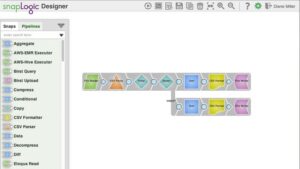
Best for: Businesses connecting applications, databases, and cloud services.
SnapLogic is an integration platform that uses visual workflows and prebuilt connectors, known as Snaps. It can help businesses move data between systems while automating related processes.
For example, a company may need to connect its customer relationship management (CRM) platform with finance software and a reporting system.
Key features
- Visual integration workflows.
- Prebuilt connectors for supported systems.
- Data movement and application integration.
- Workflow automation.
Pros
- Helps connect multiple business applications.
- Visual tools can reduce the need to code every workflow.
- Useful when migration is part of a larger integration project.
Cons
- Complex workflows may need technical support.
- Pricing can depend on the business’s requirements.
- It may be too complex for a small, one-time migration.
Our verdict: SnapLogic is worth evaluating if you need to connect business applications as well as transfer data.
9. IRI NextForm
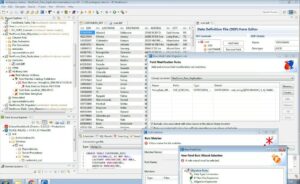
Best for: Converting data formats and moving structured data between supported systems.
IRI NextForm focuses on data conversion and migration tasks. It can help when information must be changed from one format or data type to another before it reaches the target system.
For example, a business may need to convert older data files into a format that a new application can read.
Key features
- Data and file format conversion.
- Data type conversion.
- Support for selected migration and data management tasks.
- Data masking options for supported workflows.
Pros
- Useful for specialized conversion projects.
- Can help prepare legacy data for newer systems.
- Data masking can support privacy-conscious workflows.
Cons
- May require technical knowledge for complex jobs.
- Its focus is narrower than that of some broad data integration platforms.
- You should check support for your exact file formats and target systems.
Our verdict: Consider IRI NextForm if data conversion is a key challenge in your migration rather than ongoing cloud integration.
10. CloudFuze
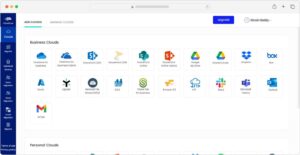
Best for: Moving files and business content between supported cloud services.
CloudFuze focuses on cloud content migration. It can help organizations move documents, files, and other content between supported storage and collaboration platforms.
For example, a business switching cloud storage providers may need to move thousands of employee files while keeping the transfer organized.
Key features
- Cloud file and content migration.
- Support for selected cloud platforms.
- Migration monitoring and reporting.
- Tools for managing larger content transfers.
Pros
- Useful for cloud storage changes.
- Helps organize content migration across business teams.
- More suitable for file-focused projects than a general database tool.
Cons
- Not designed for every database migration scenario.
- Available features depend on the connected services.
- Permissions, shared links, and metadata need testing before migration.
Our verdict: CloudFuze is worth considering when your main task is moving business files and cloud content, rather than transferring database records.
11. Apache NiFi
Best for: Technical teams that need flexible control over data flows.
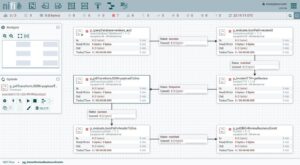
Apache NiFi is an open-source platform for moving and routing data between systems. Its visual interface lets teams build flows that determine where information goes, how it is handled, and what happens when an error occurs.
It can be useful for projects involving multiple data sources, custom rules, and ongoing data movement.
Key features
- Visual data flow design.
- Routing and processing rules.
- Flow monitoring and data tracking.
- Support for custom integration workflows.
Pros
- Open-source software.
- Flexible for specialized data movement needs.
- Useful when teams need detailed control over data flows.
Cons
- Requires technical setup and ongoing maintenance.
- Large deployments may need careful resource planning.
- Less suitable for users who want a fully managed, simple migration experience.
Our verdict: Apache NiFi is a strong option for technical teams that value flexibility and control and can manage the platform themselves.
12. Oracle GoldenGate
Best for: Large businesses that need continuous database replication and carefully planned cutovers.
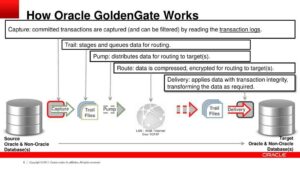
Oracle GoldenGate is a data replication platform used to capture and move database changes between supported systems. It can help organizations keep a destination database updated while applications continue to use the original system.
This is especially useful when moving business-critical databases where long periods of downtime are difficult to accept.
Key features
- Continuous data replication.
- Capture and delivery of database changes.
- Support for selected database environments.
- Tools for enterprise replication workflows.
Pros
- Designed for demanding replication scenarios.
- Can help reduce downtime during planned migrations.
- Useful when database changes must keep flowing during a transition.
Cons
- Licensing and implementation costs can be significant.
- Setup and management may require database specialists.
- The best fit depends on the source and destination systems.
Our verdict: Oracle GoldenGate is worth evaluating for complex, business-critical migrations where continuous replication is a key requirement. Test compatibility and recovery procedures before production use.
How to choose the right data migration tool
The best data migration software is not always the tool with the most features. It is the one that fits your source system, destination, data size, budget, security needs, and migration plan.
Use these questions to narrow your options.
1. What type of data are you moving?
Start by identifying the information you need to transfer.
- Databases: Consider AWS DMS, Azure Database Migration Service, or Google Cloud Database Migration Service, depending on your destination.
- Business app data: Consider Airbyte, Fivetran, or SnapLogic.
- Cloud warehouse data: Consider Fivetran or Matillion.
- Files and documents: Consider CloudFuze.
- Custom data flows: Consider Apache NiFi.
- Oracle database replication: Evaluate Oracle GoldenGate.
These are starting points, not guarantees. Confirm that the tool supports your specific source and destination.
2. Do you need a one-time move or ongoing synchronization?
A one-time migration copies data from the old system to the new one. Ongoing synchronization keeps the destination updated as new records or changes appear.
If you need to keep systems in sync before a final cutover, look for change data capture (CDC) support. CDC identifies changes made to a source database and sends them to the destination.
This can reduce the amount of data that must be copied again before switching systems. However, CDC is not available for every source, destination, or migration method.
3. How much data do you need to move?
A small spreadsheet and a multi-terabyte database have very different needs.
Before choosing a tool, estimate:
- Total data volume.
- Number of records, tables, or files.
- Available network bandwidth.
- Required transfer speed.
- Expected growth in data volume.
Run a test with a sample of your real data. A tool that works well with a small dataset may need different settings or infrastructure for a much larger migration.
4. Will you need to clean or transform the data?
Sometimes, moving data is not enough. The new system may use different field names, date formats, data types, or rules.
For example, an old system may store customer names in one field, while the new system uses separate first-name and last-name fields.
If your project needs these changes, choose a tool with suitable transformation features or plan to use a separate data preparation tool.
5. What are your security and compliance needs?
Data migration can expose sensitive information if access and transfer settings are not handled properly.
Look for:
- Encryption during transfer and, where supported, at rest.
- Role-based access controls.
- Secure credential management.
- Activity logs and audit trails.
- Data validation and error reporting.
- Support for your industry’s applicable compliance requirements.
For US businesses handling health, financial, or personal information, check the legal and contractual requirements that apply to the specific data. Do not assume a tool makes your entire migration compliant by itself.
6. What is the total cost?
The advertised price may not cover the full project.
Your total cost may include:
- Software licenses or subscription fees.
- Cloud storage and data transfer.
- Processing or compute resources.
- Engineering and implementation time.
- Testing, backup, and recovery.
- Support and ongoing maintenance.
Compare costs for your expected data volume and project duration. Ask vendors for a realistic estimate before making a final decision.
Best data migration tools by business need
If you are still unsure which software to choose, use this decision table.
| Your main requirement | Tools to shortlist |
| Move a database to AWS | AWS DMS |
| Move a database to Azure | Azure Database Migration Service |
| Move a database to Google Cloud | Google Cloud Database Migration Service |
| Build flexible data pipelines | Airbyte |
| Automate data collection for analytics | Fivetran |
| Transform data for a cloud warehouse | Matillion |
| Manage enterprise data quality | Qlik Talend Cloud |
| Connect business applications | SnapLogic |
| Convert legacy file formats | IRI NextForm |
| Move files between cloud platforms | CloudFuze |
| Build custom data flows | Apache NiFi |
| Replicate critical databases continuously | Oracle GoldenGate |
These recommendations reflect each product’s primary use case, not independent benchmark results.
What are the different types of data migration tools?
Understanding the main types makes it easier to select the right software.
Database migration tools
These tools move databases from one server, platform, or database engine to another. They may also support replication while the new database is prepared.
Examples: AWS DMS and Google Cloud Database Migration Service.
Cloud migration tools
These tools help move workloads, applications, or data into cloud environments. Some focus on database migration, while others help assess and move servers and applications.
Examples: Azure Migrate and Google Cloud Migration Center.
ETL and ELT tools
ETL stands for Extract, Transform, Load. It means data is cleaned or changed before it reaches its destination.
ELT stands for Extract, Load, Transform. Data is loaded first and transformed inside the destination system.
These tools are useful when a business needs to combine data from different sources for reporting or analysis.
Examples: Matillion, Fivetran, and Qlik Talend Cloud, depending on the workflow.
File migration tools
These tools move documents, folders, and other files between storage systems. Some also help transfer permissions, metadata, and shared content.
Example: CloudFuze.
Data replication tools
Replication tools copy changes from one system to another. They can help keep two databases synchronized while a business prepares to switch to a new system.
Examples: Oracle GoldenGate and supported AWS DMS configurations.
How to migrate data safely: A step-by-step process
Choosing the right software is only part of a successful migration. A clear plan helps reduce errors, avoid unnecessary downtime, and protect important information.
Step 1: Review your existing data

Identify where the data is stored, how much you need to move, which systems depend on it, and whether any records are outdated or duplicated.
Step 2: Choose the destination and migration tool

Confirm that the tool supports your source and target systems. Check data types, file formats, security needs, costs, and downtime limits.
Step 3: Back up your data

Create and verify a backup before changing important systems. Make sure you know how to restore it if the migration fails.
Step 4: Run a test migration

Move a small sample first. Check whether records, relationships, permissions, and important fields appear correctly in the destination.
Step 5: Run the full migration
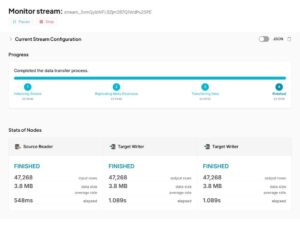
Follow your migration plan and monitor progress, errors, system performance, and data transfer. Use ongoing replication if your chosen setup supports it and your project requires it.
Step 6: Validate the migrated data
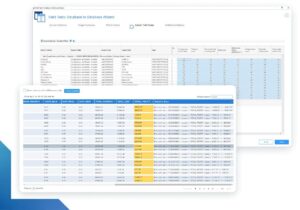
Compare record counts, important values, relationships, and application behavior. Investigate mismatches before approving the new system.
Step 7: Switch systems and monitor

Move users and applications to the new system only after the required checks pass. Keep a recovery plan and monitor the new environment after the switch.
Final recommendation
The best data migration tools help you move information accurately, protect important records, and make the transition to a new system easier to manage. But the right choice depends on the job you need to complete.
For database migrations, start with the migration service offered by your target cloud provider. For recurring data pipelines, compare Airbyte and Fivetran. To data transformation, evaluate Matillion or Qlik Talend Cloud. For cloud files, consider CloudFuze, while technical teams with custom routing needs can evaluate Apache NiFi.
Before making your final choice, test the tool with your actual data and confirm that it meets your security, performance, and recovery requirements. A careful test can help you avoid costly problems later.
Frequently asked questions
Q.1: What are data migration tools?
Data migration tools are software applications that move data from one system to another. They can help transfer databases, files, business application data, and information stored in cloud platforms. Depending on the product, they may also clean, transform, validate, or synchronize data.
Q.2: What is the best data migration tool in 2026?
There is no single best data migration tool for every business. AWS DMS is a strong option for supported AWS database migrations, Azure Database Migration Service suits supported Azure migrations, and Airbyte and Fivetran are worth considering for data integration and recurring pipelines. Your source, destination, budget, and technical needs should guide the final choice.
Q.3: Are there free data migration tools?
Yes. Apache NiFi is open-source, and Airbyte offers open-source and self-managed options. However, free software can still require hosting, engineering, maintenance, and support costs. Some commercial platforms also offer free plans or trials with limits.
Q.4: How long does data migration take?
It can take hours, days, or months. The time depends on the amount of data, network speed, system compatibility, transformation needs, and testing requirements. Large or business-critical migrations usually need more planning than simple file transfers.
Q.5: Can I migrate data without coding?
Yes. Some tools provide visual interfaces, guided setup, and prebuilt connectors. However, complex migrations may still require SQL, scripts, custom connectors, or help from a database specialist.
Q.6: How do I prevent data loss during migration?
Back up your source data, test the migration, validate the destination, monitor errors, and keep a recovery plan. For critical systems, define clear checks and approval criteria before switching to the new environment.